Schedule Your Day to Auto Close
Credit Batch Report, Close Balance Sheets, Suspend Orders
The Auto Close Day allows you to schedule the following features, they are a combined set of feautures that will occur on a specified time.
- Any open balance sheets will be closed and emailed.
- Pre Auths will be captured and a list of pre-auths will be emailed.
- Any open orders will be suspended, you will be emailed a list of them.
- The credit card batch will be closed - Requires setup, see below.
- The end of day report will occur and be emailed.
Detailed Explanation
Suspended Orders
When the auto close feature occurs.
It will create a list of printed (or locked) unclosed orders. These will be suspended and then emailed to you.
The email will look like this:
| # | Order ID | Order Date | Order Time | Order Total | Server Name |
|---|---|---|---|---|---|
| 1 | 902114 | 09/23/2024 | 01:48 AM | $0.30 | N/A |
For orders that are unprinted (or not locked), these will be deleted and any record of them will be removed. These are orders that will not have updated inventory, nor will they have been sent to any prep area. So deleting them is considered safe.
Credit Card Batch Report
The credit card batch will occur; this submits all your open payments that have not been settled with your processor.
You must setup a terminal named 'Batch' and it must have the appropriate credit card settings applied to process the batch.
Please note this means tips not entered will be lost. We recomend using a Pax Handheld device for table service, to ensure tips are input upon payment.
The batch email will look like this:
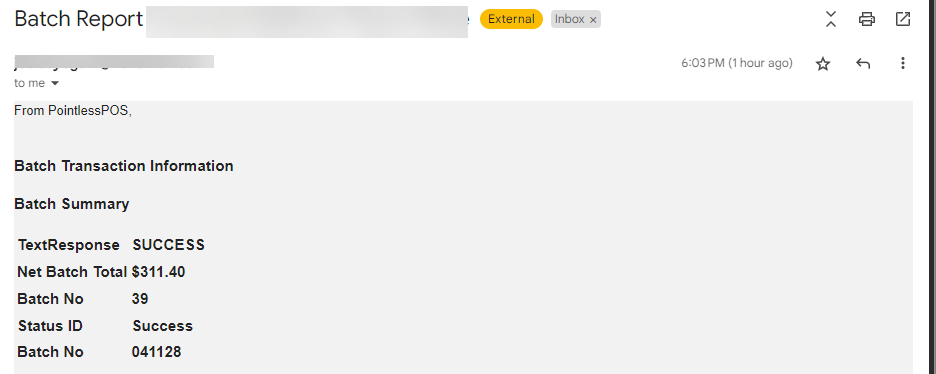
(For batches the only time you would see an error is if the device was offline or something else was disupting the batch. You will receive a reason why a batch didn't complete. But this is a rare occurance.)
End of Day Report & Balance Sheets
Your end of day reports and balance sheets are always emailed, and these will appear like they normally do.
Any balance sheets that were not closed, will be closed. You will see each of thes unclosed balance sheets individually, and that will give you a chance to review them with your staff.