Catalog Product Settings
Item Type Settings.
The POS Catalog (from the main menu) contains a list of all of the products and strains that you provide.
While there are many features to products, with respect to Metrc the primary features are configured in the Item Types , which each item is assigned when you import them from Metrc Packages.
{#} {#}
Item Types
Item Types are essential, but they are a section usually only visited during initial setup. So it's easy to forget they define certain product behaviors.
What parts of Item Types do we need to configure?
Limit Groups - (you will learn more in the videos). Item Types may be assigned one or two groups. In the case of a combined category, you must group categories together to show a summary amount. This works for products like pre-rolls. - See training video.
Assigning Cannabis Groups to Taxes that apply. - See training video.
For Weighed products, you will have some other settings, such as the exit label. However in this section we are concentrating on METRC integration. - See training video.
Default Features:
UOM - Units of Measurement are defined by the item type. This is automatically configured when you import METRC categories.
Optional Features
Other features of the Item types do apply to sales, but we cover that in other sections.
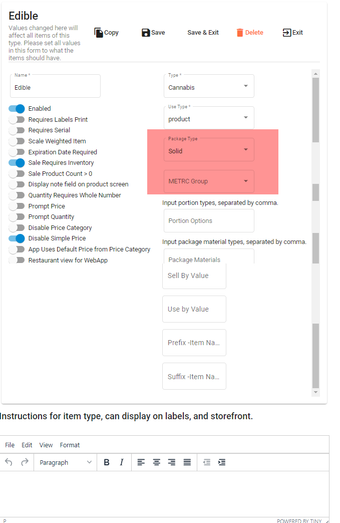
Item Types
Product Settings
Products should all be assigned an Item Type, a price. It's smart to also assign them other featuers that you see, such as a category, department and even sub category. The other feautres are there to help for customer service, however they are not required.