Designer Overview
Receipt Designer
The receipt designer allows you to select a template. Then work on the designer.

Caption label (optional)
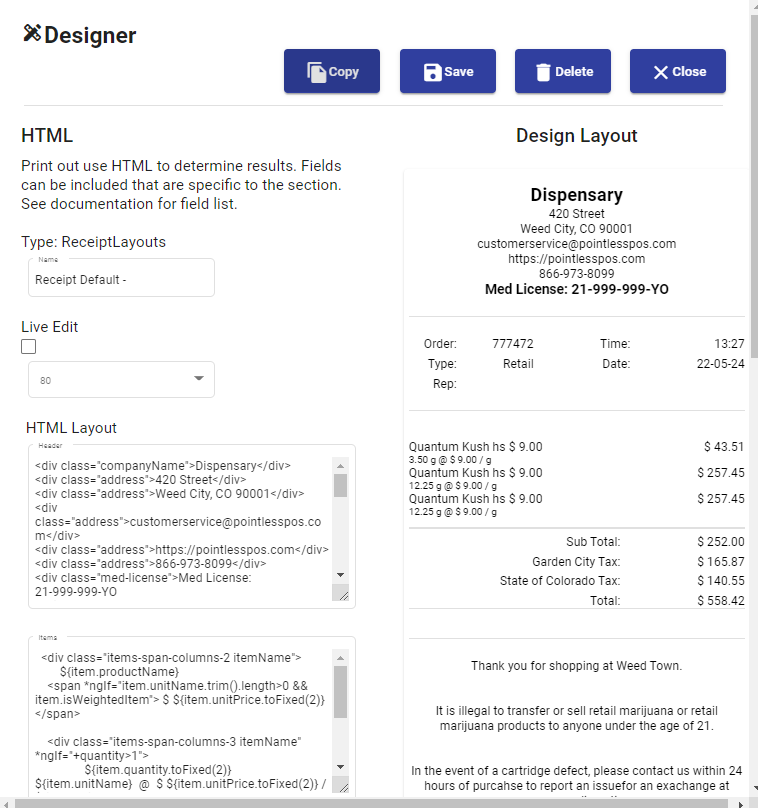
It’s beneficial to select an order you may have closed or opened from the Orders window. So what you can do is choose an order, then come back to the print settings. You will see your Order show up on the receipt preview, as shown below in the screenshot. This gives you a real-world example of the design of the receipt.
HTML Design Tip: You may need some understanding of the HTML formatting to make changes. So if you don’t have any understanding, you can submit a ticket for us to help you provide formatting changes. If you do have HTML experience, you will have example templates to work with. While at first, the coding may seem complex, if you dedicate yourself 30 to 45 minutes of getting used to formatting, you will find it’s not as sophisticated as your first glance at the instructions. Keep in mind, you can always ask us for assistance.
Caption label (optional)