💡 WorldPay/TRIPOS Format Settings
TRIPOS has specific receipt formatting requirements. Follow these examples to maintain your compliance.
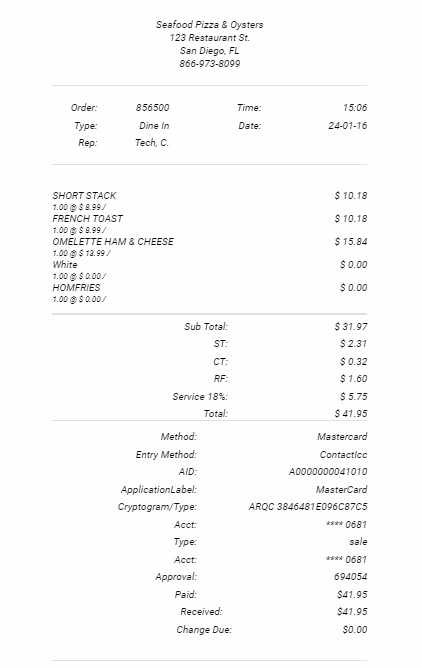
📃 Instructions
You'll want to set the credit card section of the receipt to this HTML Setting as a starting point
<div class="grid-totals-58 spacing-58 ">
<div></div>
<div class="total">Method: </div>
<div class="total">${item.paymentMethod.name}</div>
<div></div>
<div class="total">Entry Method: </div>
<div class="total">${item.entryMethod}</div>
<div></div>
<div class="total">Type: </div>
<div class="total">${item.trancode}</div>
<div></div>
<div class="total">Response: </div>
<div class="total">${item.textResponse}</div>
<div></div>
<div class="total">Approval: </div>
<div class="total">${item.approvalCode}</div>
<div></div>
<div class="total">Paid:</div>
<div class="total">$${item.amountPaid.toFixed(2) }</div>
</div>
<div class="grid-totals-58 spacing-58 ">
<div></div>
<div class="total">Received:</div>
<div class="total">$${item.amountReceived.toFixed(2) }</div>
</div>
<div class="grid-totals-58 spacing-58 ">
<div></div>
<div class="total">Change Due:</div>
<div class="total">
$${ ((item.amountReceived).toFixed(2) - (item.amountPaid).toFixed(2)).toFixed(2) }
</div>
</div>