Google Wallet (DataCap)
Google Wallet lets customers pay from an Android device using a saved card, without typing card details. The Google Wallet integration runs through DataCap PayAPI — PayAPI must be enabled first.
The Google Wallet button only appears on Android devices in a supported browser (e.g., Chrome).
Prerequisites
- DataCap PayAPI enabled (see DataCap PayAPI)
- DataCap merchant account with Google Pay enabled
- The same DataCap public key and PayAPI Merchant ID used for Apple Pay — DataCap confirms the Apple Pay PayAPI MID also works for Google Pay testing
- A valid Google Pay business ID for production (obtained through Google's Pay & Wallet console)
Enabling in Transaction Settings
- Navigate to Settings > Software & Hardware > Transaction Settings.
- Ensure DataCap PayAPI is enabled.
- Enable Google Wallet.
- Set the Apple Pay Merchant Name field — this same value is used as the merchant name displayed during Google Wallet checkout.
- Save the transaction settings.
Customer Experience
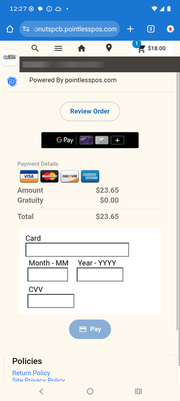
When a customer reaches the payment step on an Android device in a supported browser:
- A Pay with Google Pay button appears in the payment panel.
- The customer taps the button and selects a saved card.
- The payment is processed through DataCap.
- A confirmation appears and the order is updated.
Pre-Authorization
When an order type is configured for pre-authorization, Google Wallet runs in pre-auth mode automatically. The customer authorizes a hold on their card, and the charge is captured later when the order is finalized.
After pre-auth:
- Complete Payment — captures the authorized amount and charges the card.
- Reverse Authorization — cancels the hold and releases the funds.
Tip Presets
Customers can be presented with preset tip options and a custom tip entry during payment. The tip percentages and custom entry label are controlled by the Guest Tip Presets (% of total, e.g. 15,18,20) field in Transaction Settings.
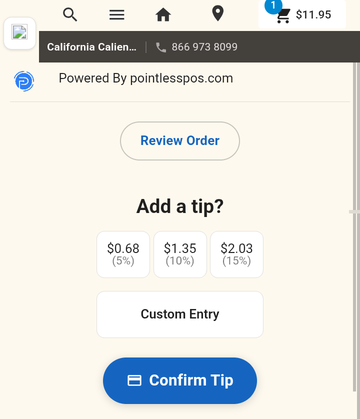
- Guest Tip Presets — Configure tip percentage options for wallet and QR payments
Troubleshooting
| Problem | Solution |
|---|---|
| Google Wallet button doesn't appear | Customer must be on an Android device in a supported browser (e.g., Chrome) |
| "Google Wallet not enabled" | Google Wallet has not been enabled in Transaction Settings, or PayAPI is not enabled |
| Payment declined | The customer's card may be declined or have insufficient funds |
Related
- DataCap PayAPI — Parent integration required for Google Wallet
- Apple Pay — Same PayAPI integration for Apple wallet payments